
GUIDE · CHATGPT AND LOGIC PRO
How to use ChatGPT
with Logic Pro 12 and 13.
ChatGPT by OpenAI can write MIDI, load instruments, set plug-ins and mix in Logic Pro when it runs in the ChatGPT app for Mac in Work or Codex. A local MCP server provides the connection to Logic. This guide shows how to connect ChatGPT to Logic through Dada Vibe Connector.
Updated 18 November 2026 · Dada Vibe
What you need
- A Mac with Apple Silicon or an Intel processor, macOS 15.6 or later, and your own Logic Pro 12 or 13 with the English interface.
- The ChatGPT app for Mac with access to Work or Codex. Availability and limits depend on your account.
- Dada Vibe Connector installed on the same Mac as Logic Pro.
How to connect ChatGPT to Logic Pro
- Sign in to the ChatGPT app for Mac on the same Mac where Logic runs and open Work or Codex.
- Choose the local environment, not a cloud environment, and select @Dada Vibe Connector.
- In Dada Vibe Connector choose ChatGPT / Codex and follow the setup. Restart the assistant if prompted and check that its MCP tools include Dada Vibe Connector.
- Allow the permissions macOS asks for: mainly Accessibility and Automation for Logic Pro and System Events.
- Ask for the read-only connection check, which changes nothing. Give the first musical task only once the AI can read Logic.
Use Dada Vibe Connector to read the current Logic Pro status and report any missing permissions. Do not create, close, edit or save a project, and do not start playback.The AI chat must run in the desktop app on the same Mac as Logic. A web chat or a chat running in the cloud cannot reach Logic on your Mac.
Allowing tools in Codex
With your confirmation, the connector can add an approval for its own tools in Codex so that they do not ask every time. You can decline and manage approvals in Codex settings.
Which model to choose
We test with GPT-6.1 Sol, including a lower reasoning setting. The highest model or reasoning setting is not required for that tested setup. We have not qualified every other model.
First prompts for ChatGPT in Logic
Start in a new empty project that you save yourself. Give one step, let it finish, listen to the result and then say what comes next.
- “Write an eight-bar house melody into the selected MIDI region.”
- “Create a drum and bass beat at 174 BPM.”
- “Change the bass sound to something darker and lower it by 2 dB.”
- “Add a limiter on the output and measure loudness.”
Ten prompts for a first house sketch ↗
What ChatGPT can do in Logic Pro
With Dada Vibe Connector, ChatGPT has the same tools as Claude: MIDI, instruments and effects, supported plug-in parameters, automation, mix, output chain, arrangement, tracks and export. The Phonk, Afro House, RnB and Latin House demos below were made with ChatGPT.
A simple step takes tens of seconds to a few minutes. ChatGPT cannot operate every Logic feature or every plug-in, and the musical decisions stay with you.
Working from your phone
Typing or moving the mouse on the Mac can interrupt the connector. You can send follow-up instructions from the ChatGPT mobile app while the Mac does the work.
Demos in Logic Pro
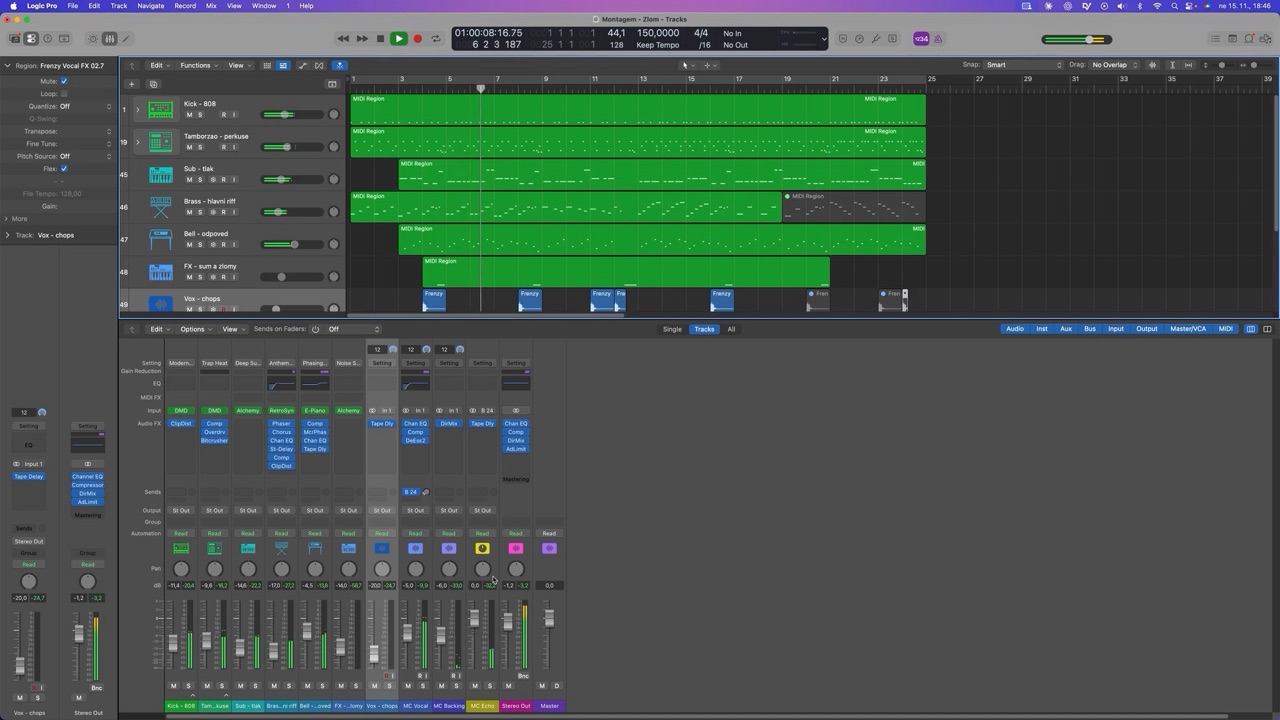 Phonk (Brazilian funk) in Logic Pro 12 with ChatGPT
 Afro House: created with ChatGPT
 RnB: created with ChatGPT
 Latin House in Logic Pro 13 with ChatGPT